Extended Realities (VR/AR/MR): Glossar

With every new project that involves XR in some way, designers face the problem that the terminology of this new branch has not yet fully manifested itself. A common vocabulary for these technologies is therefore of utmost importance to keep communication within the team clear and direct. For this reason, we would also like to share our XR compendium with you.

Basics

Augmented Reality

Projection of virtual objects onto the real world in real time. Compatible with modern smartphones or AR headsets like Microsoft Hololens.

Augmented Virtuality

Projection of real objects onto a virtual world. Requires VR-compatible headsets such as HTC Vive or Oculus Rift.

Virtual Reality

Simulation and display of virtual objects in stereoscopic images. Creates spatial effect by recording the user’s eyes separately.

Mixed Reality

Umbrella term for all technologies that are located between the unadulterated, real world and completely virtual reality (e.g. augmented reality or augmented virtuality).

Reality-Virtuality Continuum

The reality-virtuality continuum shows the different stages in the transition from real space to a completely virtual environment.

Reality-Virtuality Continuum

Hardware & Technology

Eye Tracking

Capture and record the eye movements of a personality.

Head Tracking

Head tracking refers to a method of detecting the position, attitude, and movements of the head to provide a display corresponding to the viewing angle or to enable other head-based control. (wikipedia)

HMD — Head-Mounted Display

A head-mounted display is a visual output device worn on the head that displays images generated on a computer on a screen near the eye or projects images directly onto the retina through virtual retina display (e.g., HTC Vive, Oculus Rift, Microsoft Hololens).(wikipedia)

Holophonic Sound

Spatial audio playback method with the aim of creating virtual, acoustic environments. The generated sound can thus serve for spatial orientation in a scenery.

HUD — Head-up Display

Display system in which the user can maintain his head position or viewing direction because the information is projected into the field of view. Known navigation element from the controls of computer games or modern airplanes.

Imaging

Photogrammatic design

A 3D object or environment is created automatically on the basis of a large number of photographs from different perspectives (3d scan) in a 3D program without modeling.

Stereoscopy

Generation of spatial images using two conventional images showing a scene from slightly different viewing angles.

Feedback & User Guidance

Haptical Feedback / Rattle

Haptic feedback of a device, e.g. vibration on a controller.

User Experience and User Interface

Contentlayer / Screen Space

Areas decoupled from the scenery, which can hold additional information.

Diegetic UI

Positioning of the user interface both in the spatial environment and in relation to the context and setting of the application.

Fuse Button

UI elements that trigger a visual countdown when the user has focused on them for a defined time. Replaces direct feedback when the user has no way to trigger an action on a button or hotspot using a controller or physical buttons on the viewer.

Gaze Selection

Selecting UI elements using eye tracking, or head movement.

Hotspot/Hotspot with label

UI element that is linked to an object in the scenery.

Hotspot-Menu

Additional navigation layer in a hotspot.

Hotspot-Area

Sensitive area in which a hotspot is activated.

Hover

Visual/auditory/haptic feedback when the reticle activates a UI element.

Reticle

Corresponds to the mouse pointer in a conventional interface. Controlled either by head movement, gestures or controller.

Spatial UI

Positioning of the user interface in the virtual or real spatial environment (e.g. as a projection on walls).

Interactions

360° Image/Video

Correspond to spherical panoramas. Spherical panoramas or spherical panoramas are panoramic images in which all angles visible from one point of view are reproduced. On such photographs, an image angle of 360° in width and 180° in height is reproduced. (wikipedia)

Immersion

Describes the effect that makes the user of a virtual environment feel real. If the degree of immersion is particularly high, it is also referred to as ‘presence’.

Position Tracking

Detection of the position, attitude and movements of a body in space.

Transporter/Teleport

Hotspot that leads to a change of location within the application.

VR Video

Stereoscopically captured 180° or 360° video that allows the user to look around.

Design

Context Design

Design in relation to the user’s current context (e.g., location, activity, time) to provide more user-friendly results.

Equirectangular

Back translation of a spherical panorama into a two-dimensional image. Equirectangular two-dimensional images represent 180° image angles in the vertical image axis. The image of a virtual sphere surrounding the viewpoint is projected onto a surface.

First-person-design

The principle of not guiding the user as the designer of the application. The user should be free to test the possibilities himself and make decisions independently.

Non-narrative-design

The intentional absence of a story within an application. Instead, the user should be able to develop his own story.

Skeuomorphism

The leaning of visual, auditory, or haptic elements against real objects/processes.

Environment

Field-of-view

The field of view, is the area of a scene that the user can see at any given time.

Dream vs. reality–A Beginner’s Guide to User Interfaces in XR

Five years after the arrival of VR technologies in our technology-centric society, extended realities are still a red-hot topic. The possibilities still seem limitless.

As an experienced digital brand agency, we are always expanding our in-house realities and can assure you that it is far from too late to jump in. Therefore, we would like to share with you some learnings as orientation, inspiration and good practices. Here are our golden rules for designing user interfaces for XR applications.

Learn from conventional media

As a pioneer in an extremely young and at least equally unexplored terrain, one naturally likes to rely on the familiar and one’s own experience from less immersive and more conventional media.

In Dead Space 3, the glowing spine indexes the damage taken, while the weapon displays the remaining ammo via hologram. Image source: dreamdawn.com

Game design is the ideal source of inspiration, as three-dimensional user interfaces have been explored there for decades. Since the days of the first consoles, game designers have been looking for ways to embed their user interfaces into the setting and narrative of their creations to maximize immersion.

While this is not true for all games, role-playing games in particular are based on the principle of immersing the user as much as possible in the virtual world.

Star Citizen not only presents the UI in a believable way, but also makes it visible to other players. Image source: vrnerds.de

Unbelievable interfaces create a disturbing dissonance here, which can quickly lead to the loss of the player’s attention. A central aspect that must also be avoided in XR applications in order to achieve the greatest possible immersion for the user.

Dirt Rally offers only authentic speedometer and cockpit displays for orientation. Image source: uploadvr.com

The solution is the diegetic UI, i.e. a user interface that exploits the spatiality of the application as well as the narrative and the setting in order to provide the user with credible information. This can be, for example, the clock on the protagonist’s arm, to which attention must be paid at regular intervals so as not to miss important events, or the dashboard in the cockpit of a vehicle, which can be used to read off speeds and other parameters.

More about UI in video games in this artikel of Anthony Stonehouse.

Choose the right interface concept

Probably the most important aspect for all design in XR is to always be aware of the aim and nature of the project. For example, a minimalist AR companion for concertgoers does not need to be absolutely immersive. Authenticity may not be the primary focus in such meta-interfaces. In this example, Diegetic UI is not superior to a regular, static interface, but only complicates the user experience unnecessarily.

Overall, user interfaces can be divided into three categories. Static UI, places information as a static overlay over the user’s field of view (this method is most popular with AR apps). In comparison, Spatial UI uses the three-dimensional environment to position the interface, such as a floating menu that curves around the user. Finally, there is Diegetic UI, based on which one does not break with the narrative of the application and the authenticity of the setting, and renders user-relevant information through believable shapes (a working clock on the wall, the display of a virtual smartphone, etc.). Before starting any project, it is therefore particularly relevant to weigh the pros and cons of the different platforms, as well as the different UI methods, and find the most effective solution for this project.

Design cross-platform and in patterns

The biggest challenge of Extended Realities – and also the biggest difference to conventional media – is the diversity of interaction design. The various disciplines could not be more different: While one application is controlled via motion tracking through gestures and hand movements, the next uses exclusively controllers and buttons, whereas another works only via gaze control.

This rich fauna of interaction possibilities requires strong design patterns and pattern libraries, especially for projects across multiple XR platforms, so that the user journey and user experience remain as consistent and user-friendly as possible.

Guide the user – gently and cautiously

Good UI: Clean, crisp and comprehensive. Image source: aixlab.com.

In the same vein, interface density is something to consider. Popups and crowded interfaces are already confusing on two-dimensional media and cause some headaches, but in XR – especially when you are positioned in the middle of the UI – chaotic and crowded UI has a claustrophobic effect.

Therefore, it is recommended to keep your distance first, let the user approach the virtual environment, and only then interact.

Final Thoughts

In any sense, one should not be put off by XR and its associated complexity. As a trailblazer, new aspects are explored every day and the opportunity to pioneer new niches is hardly so close in any other field. Thanks to open source software such as Unity and Blender, the entry threshold is extremely low and even laymen can build prototypes within a very short time. Go explore!

Pattern Libraries for Extended Realities

All over the world, designers and developers are working on new extended realities applications. In contrast to web or mobile applications, however, there are as yet no established UX patterns that designers can fall back on to make it easier for users to get started or to create recognition value in the sense of the brand. If good examples of user experience and visual design emerge in XR projects (design patterns), it is worth documenting them in a dedicated online library. In this way, future XR projects can be developed much faster.

Benefits of pattern libraries for XR

A pattern library makes it possible to move XR projects forward more quickly because applications do not have to be developed from scratch. Instead, designers and developers can use existing patterns for user experience and visual design or develop new patterns based on them.

The existing patterns also ensure consistent design. This is particularly important in extended realities projects, as applications are developed for very different viewing situations (screen, VR, Hololens) and interaction possibilities (touch, controller, gauze, gesture) within the same brand.

In XR, a brand is allowed to be much more innovative and courageous, in line with user expectations, and to combine familiar elements with something new. The entire corporate design can benefit from these new impulses and adopt new design aspects.

Working on the pattern library also helps to establish a structured design process. The design patterns are processed in a structured manner according to their prioritization and supplemented in a sensible, forward-looking manner.

How To

A company-wide pattern library can only be developed on the basis of real projects that involve real requirements. It is important that the basic conditions of the design work are right: work must be consistently user-centered, in the sense of the brand, and with a constant view of the various requirements. If the conditions are right, a consistent and sustainable pattern library will emerge step by step.

A stable foundation for this is the brand strategy. The Branded Interactions Design process has also proven itself in extended realities projects: design principles for the various design disciplines, such as look & feel and user guidance, are developed in accordance with the brand values. These can be extended to include XR-specific aspects such as environment, force feedback or sound. On this basis, a mood board is developed that shows the cornerstone for the general look & feel.

In einem gemeinsamen Workshop mit dem Product-Team werden die benötigten Patterns für die anstehenden Projekte zusammengetragen und ggfs. zusätzliche Patterns definiert, die in zukünftigen Projekten benötigt werden. Alle Patterns werden in ein Backlog übertragen und priorisiert.

The design team can now work through the design patterns in individual sprints.

Ideally, each new pattern is elaborated directly for the different technologies so that developers and designers can later use them in corresponding projects.

At the end of each sprint, the resulting patterns are entered as a draft in the online pattern library – for example in Frontify – so that the coordination with the product owner can take place directly there. After the coordination, the patterns are finally made available to the other teams.

A pattern library can only function if it is viewed as a flexible and living document that is continuously developed further through input from new projects and feedback from users and designers.

Controls

When developing design patterns, designers should consider the different interaction possibilities and plan and develop patterns with foresight.

Touch Screen

In screen-based augmented reality, the user moves the mobile or tablet device to discover the augmented reality and interacts using touch gestures.

Gaze

Gaze control tracks the position of the headset. A ‘reticle’ – a kind of virtual crosshair – is used to target and select objects.

Gaze and Commit

Gaze and Commit combines gaze controls for selection with the simplicity of gesture controls to interact with virtual objects.

Gesture

Users can see a virtual version of their hands in VR and interact with objects, the environment and navigation elements using gestures.

Controller

Controllers are familiar to most people from the gaming world and allow users to perform complex tasks in VR.

Structure for a Pattern Library

Due to the different technologies, an XR pattern library can become very extensive. A well thought-out structure at an early stage helps designers, developers and product owners to find the right patterns for their project.

In principle, the patterns should be sorted by controls. Within these supercategories, the patterns can be structured like this, for example:

– Usability Essentials
– Design Basics

Design Patterns

General Style and Behaviour
Behaviour of Interactive Elements
Transitions
Reticle
Interacting with the Application
Splash Screen
Loader
Hints
Menu

Interacting with Objects

Selecting Objects
Positioning Objects
Hotspots
Text
Layer

Interacting with the Environment

Scanning for Space
Changing the Environment

Five Learnings on Brands in Extended Realities

As designers, we move into new territory in Extended Realities (XR). Only rarely do we get the chance to design applications for new technologies and face new design challenges. It’s not just about designing for another dimension that brings its own unique paradigms. It is also about designing for an immersive medium that combines significantly more design aspects than screen-based media. Elements such as space and environment, lighting, sound and haptics must work together consistently to convey a unified image in the spirit of the brand.

Full immersion in a virtual world or augmented reality also enhances the effect on the user. In contrast to screen-based applications, which are always viewed with a certain distance, immersion in extended realities causes a more intense experience, which also increases the potential effect of the brand many times over. This makes brand-appropriate design in extended realities all the more important.

But how do designers develop a brand for virtual three-dimensional space? And how do you transform an established brand for these new media? We have compiled the five most important lessons learned from our Extended Realities projects for you.

1. Think Strategically

A stable brand foundation is the starting point for branded design – in all media. The Branded Interaction Design process has also proven itself in Extended Realities projects: For each brand value, we formulate design principles that define the brand’s behavior toward users.

The classic design disciplines such as look & feel, animation, transitions, etc. should be supplemented by special design aspects for extended realities. These include, for example, the look & feel of the environment, the sense of space and lighting, force feedback or sound.

2. Be Bold

In a new medium, a brand is allowed to present itself more boldly. In fact, it has to, because the user expectations associated with extended realities go beyond what has already been seen. A well-known brand in extended realities is expected to surprise and delight. Virtual, augmented and mixed reality offer the right platform for this.

The important thing is that the use case fits the brand and creates essential new value for customers or employees. One should avoid designing an application just to have an XR case. Only then can the application contribute to the positive perception of the brand.

3. Combine the good with the new

The first question that arises with every design is: Which elements do we take over from existing corporate design and which new elements must there be?

Central is of course the logo, which finds its use for example in the splash screen of the application. In our projects we have used a reduced version of the color palette, for example a dark tone as a base for layers etc. and a light blue tone for central design elements. In addition, there are often already interaction elements whose basic look and feel can be transferred to Extended Realities.

For our Extended Realities projects, we have also developed our own effect based on the existing color palette, which is used as animated feedback or transition. In this way, we exploit the potential of Extended Realities and further develop the corporate design in the spirit of the brand.

4. Mind the details

The whole is always more than the sum of its parts. This also applies to Extended Realities applications: The sum of the design aspects makes up the brand experience, and their proper interaction determines whether the whole feels round.

Due to the multitude of design aspects that come together in Extended Realities, it can be easy for the design of individual aspects to lack detail, but ambience and sound, interactions and force feedback, etc. should be coordinated.

In addition, the individual aspects within the application should be designed as coherently as possible. Design patterns must work for different contexts and cases within the application and be thought across media.

5. Design for eyes and ears

“Sound is 50% of the VR experience” writes Casey Fiktum in his book ‘VR UX’. Sound not only plays a central role as feedback on user actions, but can also help to better integrate interface elements into the virtual or real environment (for example by supporting transitions auditorily) or serve as 3D sound for orientation.

Applications for mobile devices or AR headsets must of course work without sound, as users are often in public spaces or talking to other people around them while using them.

Especially in VR, however, sound primarily creates atmosphere and thus has a decisive influence on the brand.

Prototyping Interfaces – Interaktives Skizzieren mit vvvv

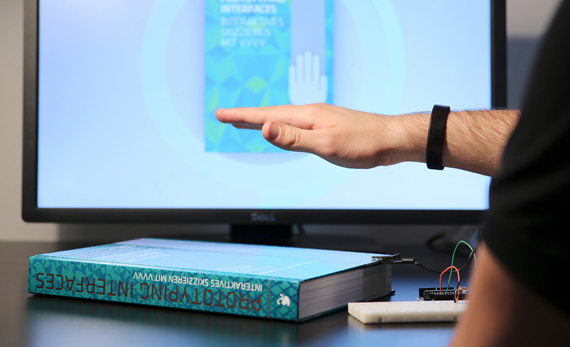
Seit einiger Zeit steht ein weiteres Buch aus dem Hermann Schmidt Verlag in unserem Regal – Prototyping Interfaces – Interaktives Skizzieren mit vvvv. Das Buch, das aus einer Abschlussarbeit entstand, beinhaltet Anleitungen und Praxisbeispiele, um Gestaltern die Möglichkeiten des Physical Computing zu eröffnen. Wir haben mit den Autoren über die Entstehung des Buches gesprochen.

Das Ergebnis des Designprozesses ist heute nicht mehr nur ein statischer Gegenstand. Wir gestalten Interaktionen – Dinge, die sich verhalten und die dem Nutzer oft physische Aktionen abverlangen. Für uns Designer bedeutet dies, das wir uns auf einen neuen Gestaltungsprozess einlassen müssen, dessen zentrales Werkzeug das iterative Austesten mittels Prototypen und interaktiven Skizzen sind. Das Buch Prototyping Interfaces bietet Beispiele und code snippets (auf prototypinginterfaces.com) für die wichtigsten Interaktionen wie z.B. Tracking-Verfahren und den Einsatz von Sensoren.

Prototyping Interfaces ist aber auch ein Appell: Designer sollen stärker auch die (Aus)gestaltung der Funktionalität übernehmen und dies nicht der IT überlassen.

Am letzten Mittwoch war Mark Lukas – einer der Ko-Autoren von Prototyping Interfaces – zu Gast bei think moto und hat bei uns über die Hintergründe, die Entstehung des Buches und Prototyping in der Praxis gesprochen. Continue reading “Prototyping Interfaces – Interaktives Skizzieren mit vvvv”

KOUYOU Update Ende Mai

KOUYOU ist eine poetische augmented reality App, mit der sich Nachrichten auf japanischen Ahornblättern in die Welt hinaus pusten lassen. Im Explore-Modus kann man Nachrichten in der Umgebung aufheben und lesen. Oder man stöbert auf einer Weltkarte in den Blättern. KOUYOU verwendet Kamera, Mikrofon, GPS und Kompass des iPhones. Anbindung von Google Maps und Facebook. Ende Mai gibt es viele neue Features wie das Pustbarometer, mit dem man noch besser Entfernungen durch seine Pustkraft steuern kann, oder den Kompaß. Ausserdem wurde die Performance optimiert. Alle Infos zum Release auf www.kouyou.de

Interaktive Augmented Reality Installation

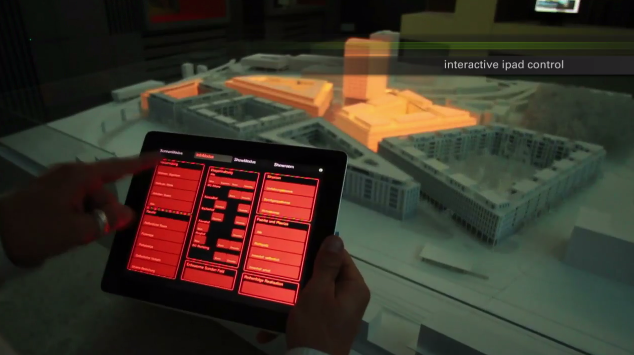
Tolle Augmented Reality Installation auf ein Architektur Modell! Visualisiert werden verschiedene Tagessistuation (Nacht, Tag, Schatten, Sonnenverlauf), aber auch Informationszonen (Grüne Bereiche, Transport etc.).

Die Projektion wird u.a. mit einem einfachen iPad Interface gesteuert. Technisch wurden u.a. 44 dimmbare Dali Lampen, 6 DMX Lampen (LED Lampen), 6 Mac Minis, 9 Full HD Beamer, ein iPad, ein Touchscreen und ein Audio System verwendet.

Realisiert von projektil.ch

We minimize and compensate our CO2 consumption.

Cookie Consent with Real Cookie Banner